Author: admin

  • Tips for IT Network & Infrastructure Students: How to Stand Out and Succeed

    Tips for IT Network & Infrastructure Students: How to Stand Out and Succeed

    If you’re planning to apply for an internship in IT networking or infrastructure, you’re already on the right track. The industry is always looking for people who understand networks, servers, security, and real-world troubleshooting. But the competition can be tough—so how do you stand out?

    Here are the best tips to help you prepare, impress during interviews, and perform confidently during your internship.

    Please choose where to do your IT networking or infrastructure internship, many students aim for government agencies because they sound stable and prestigious. However, if your main goal is learning, hands-on experience, and skill development, an SI company is often the better choice.

    System integrators handle:

    • Real client projects
    • Network deployments (Here where my skills when i need to replace current network switch where i learn how to read command)
    • Firewall setups
    • Server migrations
    • Troubleshooting across different environments

    You’ll get more chances to touch real systems compared to government offices, where interns may only assist with basic tasks.

    Many SI companies are partners with vendors like:

    • Fortinet
    • Cisco
    • VMware
    • Microsoft
    • Dell
    • HP

    Interns often get access to training or at least exposure to enterprise tools you won’t usually see in government environments.

    Government internships often involve:

    • Paperwork
    • Documentation
    • Basic helpdesk tasks

    Meanwhile, SIs are technical by nature — meaning most of what you do directly relates to IT networking or infrastructure.

    When you perform well during your internship, you increase your chances of being absorbed into the company. Based on my own experience, many companies—especially SI (System Integrator) companies—tend to offer full-time positions to interns if:

    • They see strong potential
    • They have available openings
    • You show good attitude and willingness to learn
    • You can work independently with proper guidance
    • You contribute value to the team
    • You show reliability and professionalism

    Internships are not just for learning—they are also a trial period where the company gets to know you, your work habits, and how well you fit into their environment. If you consistently show initiative, ask good questions, and handle tasks responsibly, you become a strong candidate for a permanent role.

  • FortiGate Firewall? Why i love this firewall

    FortiGate Firewall? Why i love this firewall

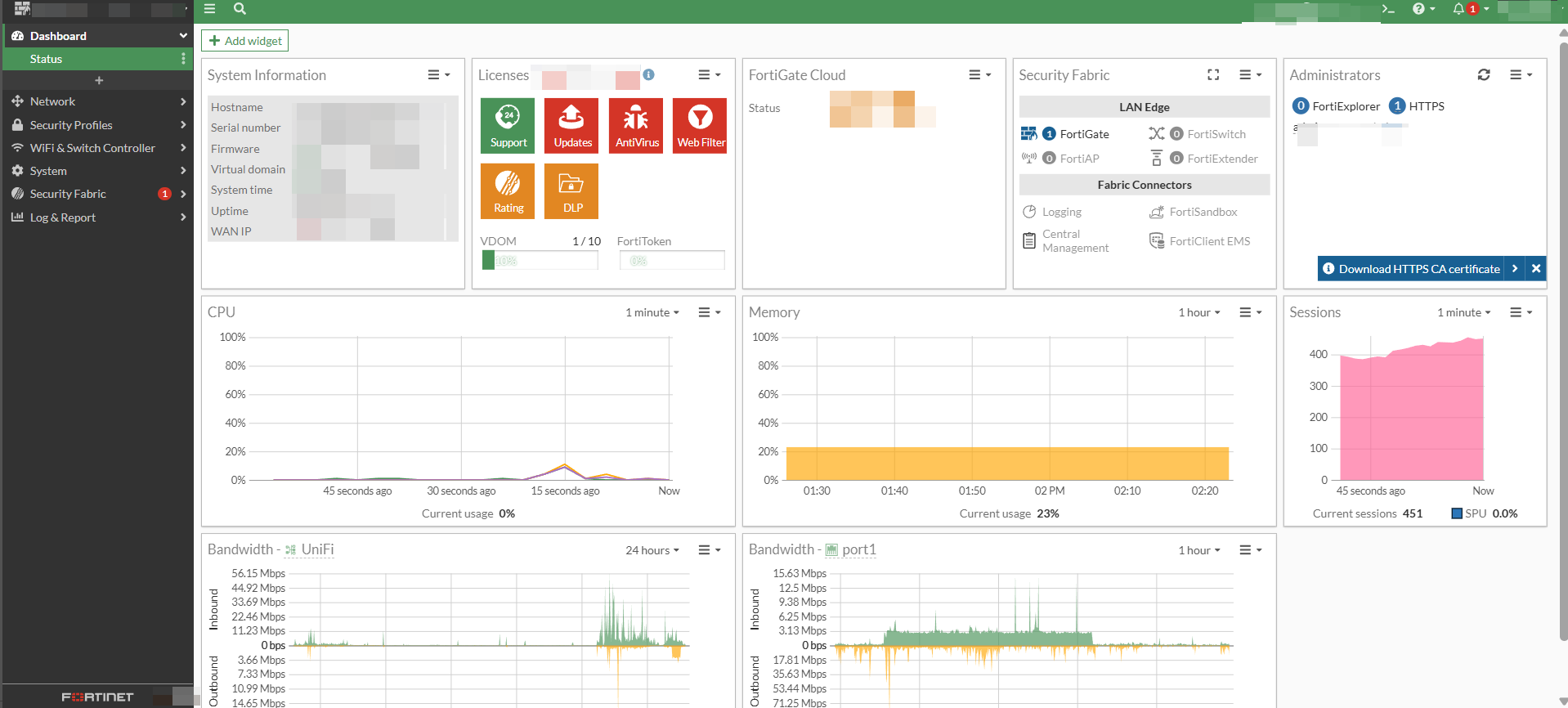
    FortiGate is a popular firewall appliance developed by Fortinet, designed to protect networks from cyberattacks, unauthorized access, and harmful traffic. It’s widely used in businesses of all sizes—from small offices to large enterprises—because of its strong security features, fast performance, and easy management

    First thing is fortigate dashboard is very easy to understand. Can configure WAN with PPPOE which in Malaysia required vlan 500 for sub interface. There is one Firewall that cannot make direct sub-inferface vlan but that model is very good.

    Pricing for fortigate + subscription is not very high which is good for small business to protect its internal network

    Fortigate is not only Firewall available in commercial but got other brand

    Key Features of FortiGate

    1. Firewall & Access Control

    Allows or blocks network traffic based on rules you create.

    1. Intrusion Prevention System (IPS)

    Detects attacks and blocks them before they reach your devices.

    1. Web Filtering

    Controls access to websites by categories (e.g., social media, gambling, adult content, streaming, etc.).

    1. Antivirus & Malware Protection

    Scans network traffic to prevent harmful files from entering the network.

    1. VPN Support

    FortiGate supports:

    SSL VPN

    IPSec VPN

    Useful for remote workers connecting securely to the office.

    1. SD-WAN

    Helps balance multiple internet connections and improve network performance.

  • What Is a Firewall? A Simple Explanation for Beginners

    A firewall is a security system that controls the network traffic entering or leaving a device, server, or network. Its main job is to protect your system from unwanted access, cyberattacks, and malicious activities by allowing only safe and approved connections.

    Think of a firewall as a security guard—it checks every “visitor” (data packet) and decides whether to allow or block it based on rules.

    Why a Firewall Is Important

    1. Protects Against Unauthorized Access

    Firewalls block attackers who try to break into your network or servers.

    1. Filters Malicious Traffic

    Suspicious or harmful traffic (viruses, malware, scans) can be stopped before reaching your device.

    1. Controls Network Usage

    Admins can define rules to:

    Allow or deny specific ports

    Limit access to certain websites

    Restrict certain apps or services

    1. Maintains Privacy

    Firewalls help keep your internal network hidden from the public internet.

    Did you know, Sophos provide Free Firewall Home Edition ?

    They provide Software appliance that can be installed on a dedicated Intel™ – compatible PC.

    • No subscription needed
    • Lightweight and doesn’t slow down the PC
    • Beginner-friendly but still has advanced options
    • More visibility than the default Windows firewall
    • Good for privacy-conscious users


    Alternative for Free you may check with Open Source

    • pfSense
    • OPNsense – zenarmor can be integrated with the firewall to give you more advanced protection.

  • The Most Common Mistake People Make When Creating Windows or Linux VMs

    I encounter this common issue when taking over support responsibilities for my employer’s customers. Some VMs experience repeated blue-screen errors as known as Blue Screen Of Death (BSOD), and after a quick check, I usually find that they have not been updated for a long time and never reboot for first time installation.

    Most unprofessional, i need to rollback, luckily that server is not database and just for application reading.

    When setting up a new Windows or Linux virtual machine (VM), most people jump straight into installing software, configuring services, or deploying applications. However, there’s one very common mistake that often gets overlooked:

    ❗ Not updating the VM before using it.

    Whether you’re using Proxmox, VMware, Hyper-V, Nutanix, or any other hypervisor, updating the system should always be the first step after installation.

    Why Updating First Is Important

    1. Security Patches

    Fresh installations usually come with outdated packages or missing security patches. Leaving these unpatched can expose your VM to vulnerabilities.

    1. System Stability

    Updates include important bug fixes that improve the OS stability and performance.

    1. Better Hardware & Driver Support

    Hypervisors often rely on updated kernel modules, guest tools, and drivers. Updating ensures better compatibility.

    1. Avoiding Package Conflicts

    Installing software before updating can lead to package version conflicts, especially on Linux systems.

    Examples


    🔹 Windows VM

    After installation:

    Run Windows Update

    Update drivers / VMware Tools / QEMU Guest Agent (depending on hypervisor)

    Reboot if required

    🔹 Linux VM (Ubuntu, Debian, RHEL, CentOS, etc.)

    Run updates immediately:

    Debian/Ubuntu:
    sudo apt update && sudo apt upgrade -y

    RHEL/CentOS/Rocky:
    sudo dnf update -y

    You may check your OS command with community or official website

  • Proxmox Datacenter Manager: Centralized Control for Modern Virtual Infrastructures

    Proxmox Datacenter Manager: Centralized Control for Modern Virtual Infrastructures

    Proxmox Datacenter Manager is a centralized open-source management solution for distributed infrastructures. With its unified web interface you can easily monitor and control multiple Proxmox remotes, see health and performance at a glance, and coordinate key operations across clusters and data centers.

    I found this software on this link it seems like, Proxmox want to follow VMware to manage all VM / Host in one device

    Proxmox also mention that Customers with active Enterprise Support for their Proxmox remotes also gain access to Proxmox Datacenter Manager updates and support.

    2025 so many new technology need to be explorer. IT keep growing seems too fast for me to catch it up.