The “Lobster” in the Machine: Why Everyone is Talking About OpenClaw

If you’ve been on social media lately, you’ve likely seen developers and tech enthusiasts talking about “raising lobsters” or “tinkering with claws.” No, the tech world hasn’t pivoted to marine biology. They are talking about OpenClaw, the open-source AI framework that is currently taking China—and the world—by storm.  

What is OpenClaw?

OpenClaw is an autonomous AI agent framework. While ChatGPT is like a brilliant librarian who can answer any question, OpenClaw is like a virtual employee.  

It lives on your computer (or a local server like a Mac Mini) and has “hands.” By connecting it to Large Language Models (like Claude, GPT-4, or China’s DeepSeek), you give it a brain. By giving it access to your apps, you give it the ability to:  

• Manage your Inbox: It doesn’t just summarize emails; it can draft replies and archive junk.  

• Automate Workflows: You can tell it, “Research these 10 companies, create a spreadsheet, and DM the founders on LinkedIn,” and it will execute the entire sequence.  

• Local Execution: Because it runs locally, it can move files, edit code, and interact with your operating system directly.  

Why is it so popular in China?

The craze in China has reached a fever pitch, driven by a mix of grassroots developer excitement and massive support from tech giants.  

1. “Raising Lobsters” (养龙虾): Chinese users have embraced the project’s lobster mascot. “Raising a lobster” refers to the process of setting up, personalizing, and training your own local AI agent to handle your specific life tasks.  

2. Platform Integration: In March 2026, Tencent integrated OpenClaw directly into WeChat via the “WeixinClawBot.” This allows millions of users to chat with their AI agent as if it were a regular contact, using it to handle tasks across the WeChat ecosystem.  

3. The “Agent” Race: Companies like Alibaba and Baidu have launched tools (like DuClaw) that make it incredibly easy to deploy these agents without needing a high-end PC.  

The Great Security Debate

With great power comes great… anxiety. Because OpenClaw requires broad permissions to function (access to your files, emails, and browser), it has raised significant red flags.  

• Government Restrictions: In March 2026, the Chinese government restricted state agencies and banks from using OpenClaw on work devices, citing risks of data leaks.  

• The Privacy Trade-off: To be useful, a “Claw” needs to know your life. For many, the productivity gain is worth it; for others, giving an AI the “keys to the house” is a bridge too far.

Is it for you?

If you’re tired of “copy-pasting” between AI and your actual work apps, OpenClaw represents the next step: Agentic AI. It’s the shift from AI as a tool to AI as a teammate.  
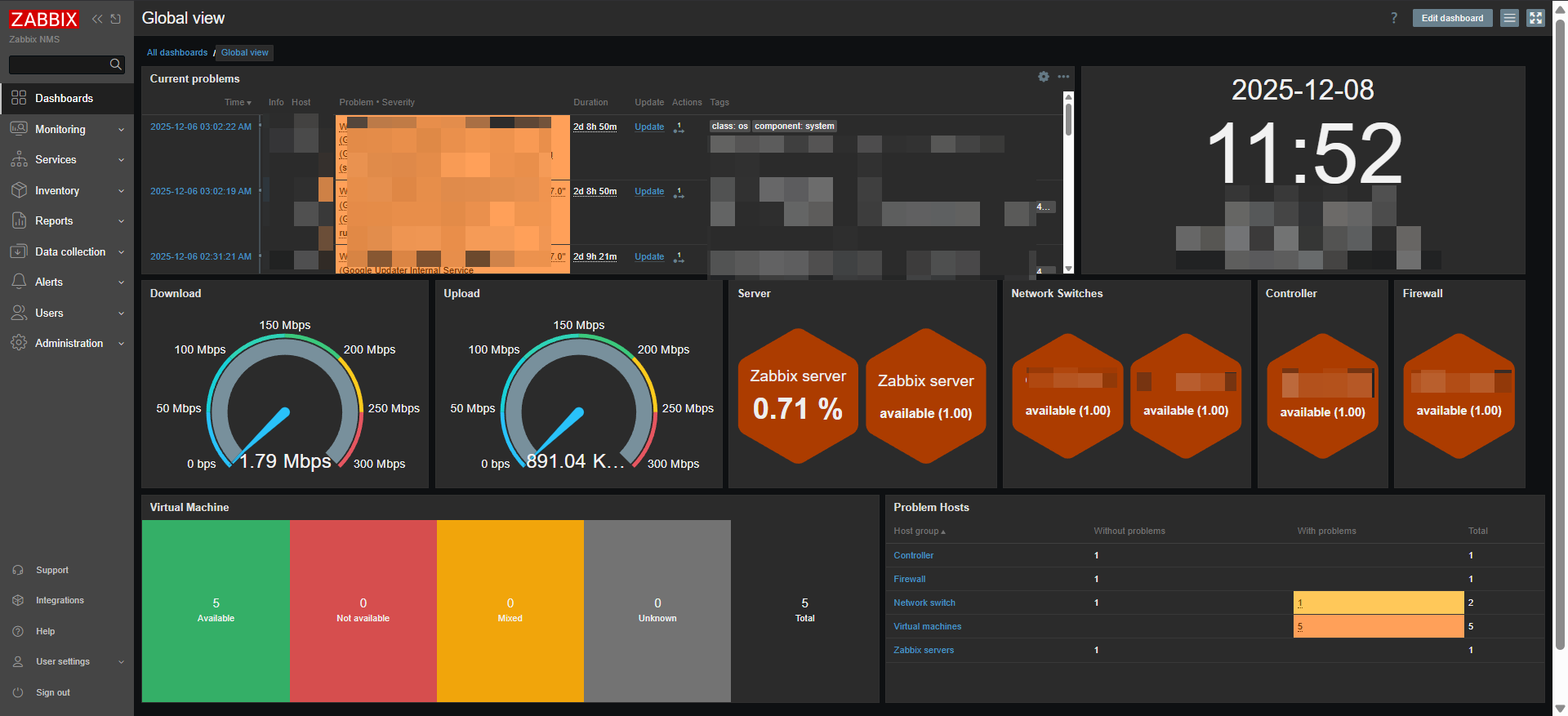
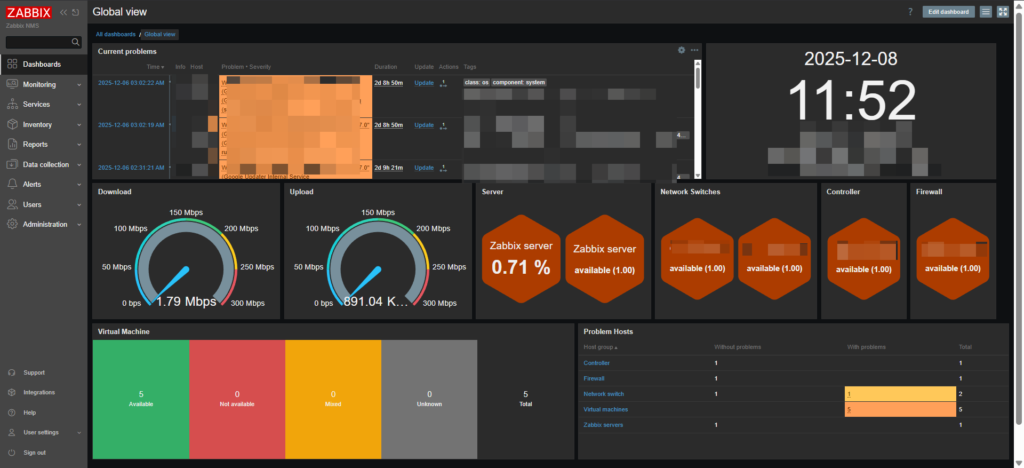
Monitor your network from a single dashboard

One solution to manage your network, firewall, server, VM & etc

Zabbix is an open-source monitoring platform used to track the performance, health, and availability of IT systems.

I kinda love Zabbix by the how it can modified or edit to show dashboard. It can either be use with SNMP v3 or agent to be monitored. I also configured it to sent to my telegram group to get notified what current happening to my infra. Zabbix Telegram Guide

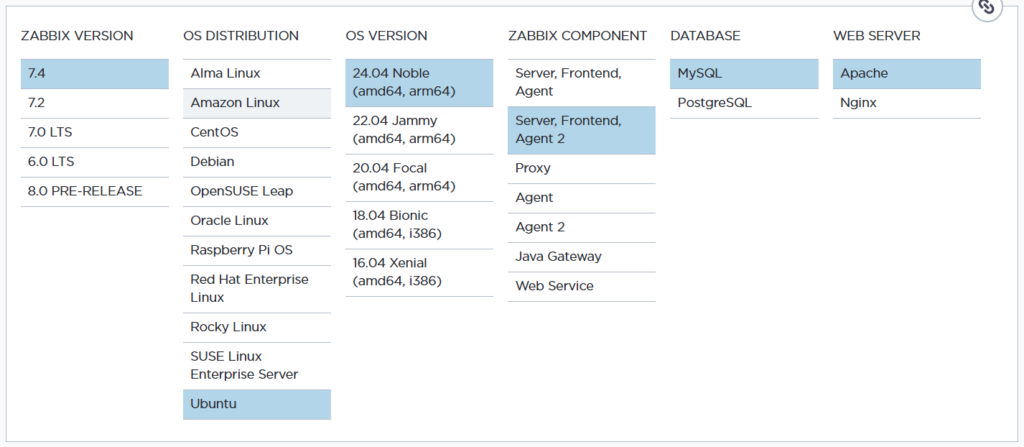
Zabbix provide installation guide which you can find through their official website.

You can find Zabbix installation through this link Click Here To Enter Zabbix Installation

a) Install and configure Zabbix for your platform# wget https://repo.zabbix.com/zabbix/7.4/release/ubuntu/pool/main/z/zabbix-release/zabbix-release_latest_7.4+ubuntu24.04_all.deb
# dpkg -i zabbix-release_latest_7.4+ubuntu24.04_all.deb
# apt update
b) Install Zabbix server, frontend, agent2# apt install zabbix-server-mysql zabbix-frontend-php zabbix-apache-conf zabbix-sql-scripts zabbix-agent2
 c) Install Zabbix agent 2 plugins

You may want to install Zabbix agent 2 plugins.
# apt install zabbix-agent2-plugin-mongodb zabbix-agent2-plugin-mssql zabbix-agent2-plugin-postgresql
Install mysql-server

I found this need to be install to run create initial database
sudo apt install mysql-server
mysql-server secure installation (Zabbix will work even if you don’t run it.)

this not necessary to configure

Running it improves database security by:
Setting root password
Removing anonymous users
Disabling remote root login
Removing test database
Reloading privileges
sudo mysql_secure_installation
d) Create initial database

Run the following on your database host.
# mysql -uroot -p
password
mysql> create database zabbix character set utf8mb4 collate utf8mb4_bin;
mysql> create user zabbix@localhost identified by ‘password’;
mysql> grant all privileges on zabbix.* to zabbix@localhost;
mysql> set global log_bin_trust_function_creators = 1;
mysql> quit;
On Zabbix server host import initial schema and data. You will be prompted to enter your newly created password.
# zcat /usr/share/zabbix/sql-scripts/mysql/server.sql.gz | mysql --default-character-set=utf8mb4 -uzabbix -p zabbix
Disable log_bin_trust_function_creators option after importing database schema.
# mysql -uroot -p
password
mysql> set global log_bin_trust_function_creators = 0;
mysql> quit;
e. Configure the database for Zabbix server
Edit file /etc/zabbix/zabbix_server.conf
DBPassword=password
f. Start Zabbix server and agent processes

Start Zabbix server and agent processes and make it start at system boot.
# systemctl restart zabbix-server zabbix-agent2 apache2
# systemctl enable zabbix-server zabbix-agent2 apache2
g. Open Zabbix UI web page
The default URL for Zabbix UI when using Apache web server is http://host/zabbix

Zabbix also offer a wide range of paid professional services that are designed to fit your unique business requirements.